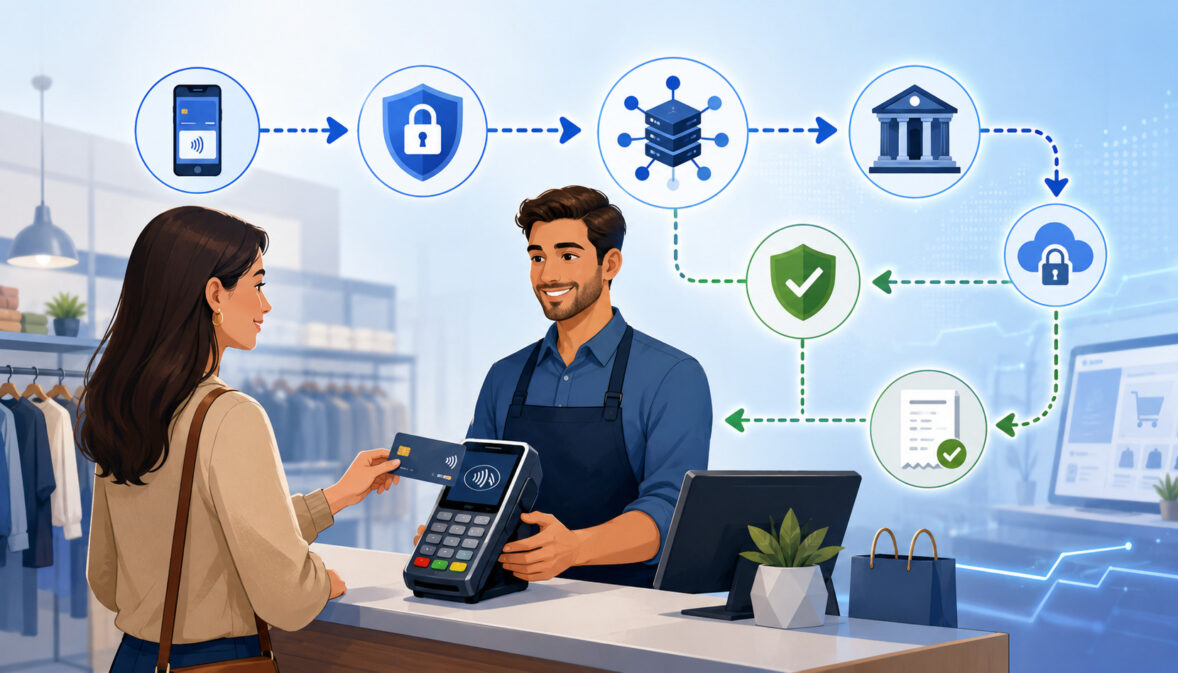
Payment authorization is the approval step that happens before a card transaction can move forward. When a customer pays with a credit card, debit card, contactless card, digital wallet, online checkout form, saved card, or virtual terminal, the merchant does not automatically receive the money. First, the payment must be checked and approved through the payment authorization process.
In a typical card payment authorization, the merchant’s POS system, card reader, ecommerce checkout, mobile app, or payment gateway sends an authorization request. That request travels through the payment processor, acquiring bank, payment network, and issuing bank.
The issuing bank is the bank or financial institution connected to the customer’s card account. It reviews the transaction and sends back an authorization response.
That response may be an approval, decline, referral, partial approval, or another status depending on the card type, available funds, credit limit, fraud risk, card status, merchant category, and transaction details.
If approved, the merchant usually receives an authorization code or approval code. This code confirms that the transaction was authorized at that moment, but it does not mean the merchant has already been paid.
Payment authorization is different from capture, clearing, settlement, funding, refunds, voids, chargebacks, and payment reconciliation. Authorization answers the question: “Can this transaction move forward?” Capture confirms that the merchant wants to complete the approved transaction.
Clearing and settlement handle the movement of transaction records and funds. Funding is when money reaches the merchant account or bank account. Reconciliation is the process of matching sales, deposits, fees, refunds, and adjustments in the merchant’s records.
For merchants, payment authorization sits at the center of checkout. It affects whether the customer can complete a purchase, whether a card-not-present authorization looks risky, whether an authorization hold is placed, and whether a transaction later becomes easier or harder to reconcile.
Why Payment Authorization Matters for Businesses
Payment authorization matters because it protects both the merchant and the cardholder before a sale is completed. For a retail store, authorization helps confirm that the card is valid and the customer has enough available credit or funds.
For an ecommerce business, online payment authorization helps screen for fraud signals before goods are shipped. For restaurants, authorization helps support tipping workflows and tab management. For service providers, it can confirm that a customer’s card can support a deposit, appointment fee, invoice payment, or recurring billing arrangement.
A smooth payment approval process can improve the checkout experience. When authorization is fast and accurate, customers are less likely to abandon a cart, leave the counter frustrated, retry with multiple cards, or contact support because a transaction failed unexpectedly.
When the merchant authorization process is poorly configured, businesses may see avoidable declines, duplicate attempts, held funds, reconciliation errors, and customer complaints.
Authorization also affects cash flow. An approved transaction still needs to be captured, cleared, settled, and funded. If a business forgets to capture an authorization, uses delayed capture incorrectly, or fails to close a batch, expected revenue may be delayed or lost.
This is especially important for ecommerce sellers, mobile merchants, professional services firms, B2B sellers, and any business that depends on reliable payment timing.
Authorization also supports fraud prevention. Security checks such as AVS, CVV verification, 3D Secure, fraud filters, tokenization, encryption, and PCI DSS controls can help merchants reduce exposure to unauthorized transactions.
The PCI Security Standards Council’s merchant resources explain why businesses that store, process, or transmit cardholder data must take payment security seriously.
At the same time, fraud screening must be balanced. If rules are too loose, the business may accept more risky transactions. If rules are too strict, legitimate customers may be declined or forced through unnecessary friction. Good payment authorization settings should support approval quality, not just approval volume.
Key Parties Involved in the Payment Authorization Process
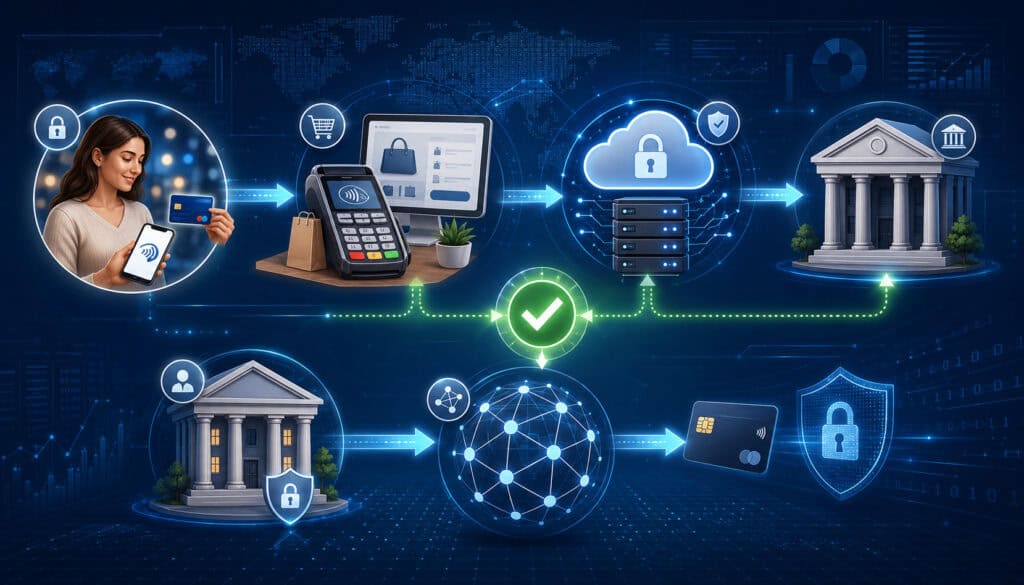
A card payment may look simple at checkout, but several parties work together behind the scenes. Understanding these roles helps business owners ask better questions about payment processing authorization, fees, decline messages, fraud settings, settlement delays, and chargeback risk.
Merchant, Cardholder, and Merchant Account
The merchant is the business accepting the payment. The cardholder is the customer using a card or digital wallet. The merchant account is the account relationship that allows a business to accept card payments and receive settled funds.
Depending on the provider setup, the merchant account may be a traditional dedicated account or part of a broader payment facilitation model.
The merchant is responsible for entering accurate transaction details, using secure payment equipment, training staff, keeping customer payment data safe, and following applicable payment rules.
The merchant also decides when to capture an approved transaction, when to void an authorization, when to issue a refund, and how to reconcile payment activity with accounting records.
For example, a retailer may authorize and capture immediately at the POS. An ecommerce seller may authorize at checkout but capture after confirming inventory. A service provider may place an authorization hold before an appointment and capture after work is completed. Each model has different operational and customer experience considerations.
POS System, Payment Gateway, and Payment Processor
The POS system or point-of-sale system is the software and hardware used to accept in-person payments. It may include a card reader, PIN pad, receipt printer, cash drawer, inventory tools, and reporting dashboard. Merchants evaluating hardware can learn more from resources such as this guide to payment terminals and POS systems.
A payment gateway is the technology that securely transmits online payment authorization data between an ecommerce checkout, virtual terminal, mobile payment page, or billing platform and the payment processor. Payment gateway authorization is especially important for card-not-present transactions because the physical card is not inserted, tapped, or swiped.
The payment processor routes transaction data, communicates with the acquiring bank and payment networks, returns authorization responses, and helps manage capture, clearing, settlement, reporting, and sometimes chargeback workflows. A processor may also provide fraud filters, tokenization tools, recurring billing support, and payment reconciliation reports.
Acquiring Bank, Issuing Bank, and Payment Networks
The acquiring bank, sometimes called the acquirer, is connected to the merchant side of the transaction. It supports the merchant’s ability to accept card payments. The issuing bank is connected to the customer side. It issued the card or manages the account behind the card.
Payment networks route transaction authorization messages between the acquirer and issuer. Credit card networks and debit card networks also set operating rules, technical standards, chargeback procedures, and data requirements.
The Federal Reserve’s payments education materials provide useful context on payment systems and how money movement depends on networks, financial institutions, and rules.
In the authorization flow, the issuing bank makes the final approve-or-decline decision in most card transactions. It may check the account status, available funds, credit limit, suspected fraud, cardholder authentication, merchant category, transaction amount, geographic signals, and previous spending behavior.
The issuer then sends the authorization response back through the network, acquirer, processor, and merchant system.
Step-by-Step Payment Authorization Process
The payment authorization process happens quickly, often in seconds, but it includes several connected steps. A business owner does not need to memorize every technical message, but understanding the payment authorization flow helps with troubleshooting declines, improving checkout, training staff, and managing customer expectations.
A typical card payment authorization begins when the customer presents payment credentials. In a store, this may be an inserted chip card, tapped contactless card, digital wallet, or swiped magnetic stripe card.
Online, it may be a card number entered into a checkout form or a saved token used for a repeat purchase. In a virtual terminal, staff may key in payment information for an invoice or phone order.
The merchant system creates an authorization request. This request can include transaction amount, merchant ID, terminal ID, card data or tokenized credential, billing ZIP code, CVV result, currency, transaction type, ecommerce indicator, recurring billing indicator, and other relevant data. The request is securely routed to the processor and onward through the payment network.
The issuing bank reviews the request and sends an authorization response. If approved, the merchant receives an authorization code. If declined, the merchant receives a decline message or code. Some responses may require additional authentication, such as 3D Secure for certain online payments, or may result in partial approval for some debit or prepaid transactions.
Payment Authorization Process at a Glance
| Step | What Happens | Who Is Involved | What Merchants Should Know |
| Customer starts payment | Card, digital wallet, saved card, or keyed payment is presented | Cardholder, merchant, POS, gateway, or virtual terminal | Accurate amount and payment entry reduce failed attempts |
| Authorization request is created | Transaction details are packaged and encrypted or tokenized where applicable | POS system, payment gateway, card reader, payment processor | Missing or incorrect data can increase declines or fraud risk |
| Request is routed | Data moves through processor, acquirer, and payment network | Processor, acquiring bank, card network or debit network | Routing can affect speed, debit handling, and reporting |
| Issuer reviews transaction | Card status, funds, credit limit, risk signals, and rules are checked | Issuing bank, payment network | The issuer usually makes the approval or decline decision |
| Authorization response returns | Approval, decline, referral, partial approval, or authentication request is sent back | Issuer, network, acquirer, processor, merchant system | A decline does not always mean fraud; it may be funds, data, or issuer rules |
| Merchant acts on response | Sale continues, customer retries, staff requests another payment method, or order is held | Merchant and customer | Capture, void, refund, or review steps depend on transaction status |
| Capture and settlement follow | Approved transactions are captured and submitted for clearing and settlement | Merchant, processor, acquirer, issuer | Authorization alone does not complete funding |
Credit Card Authorization vs Debit Card Authorization
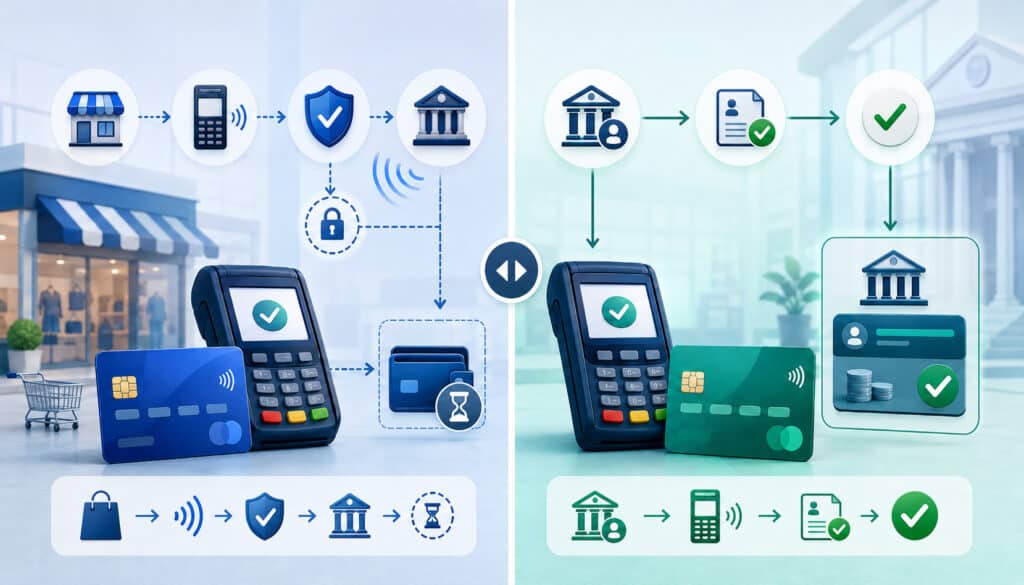
Credit card authorization and debit card authorization follow similar routing paths, but the financial logic is different.
With credit cards, the issuing bank checks whether the card account is valid, whether the cardholder has enough available credit, and whether the transaction appears acceptable under risk rules. If approved, the transaction reduces the customer’s available credit until it is captured, settled, reversed, or expires.
Debit card authorization checks the cardholder’s deposit account or linked funds. The issuer may verify available balance, PIN data when applicable, card status, account restrictions, and risk indicators.
Debit card authorization may involve PIN debit routing for in-person transactions or signature-style debit processing depending on the setup, card, terminal capabilities, and merchant configuration.
For merchants, the customer experience may look similar, but operational details can differ. Debit card authorization holds may affect a customer’s bank balance more visibly than credit card authorizations affect a credit line.
Customers may call the business if they see a pending debit hold after a void, tip adjustment, canceled order, or hotel-style preauthorization. The merchant may not control exactly when the issuer releases the hold.
Credit card payment authorization is often more flexible for delayed capture, preauthorization, and incremental authorization in certain industries. Debit transactions may have tighter rules or different behavior, especially where PIN entry, partial approval, cashback, or account balance restrictions are involved.
For restaurants, debit and credit behavior matters when adding tips after authorization. For service businesses, it matters when placing deposits. For ecommerce businesses, it matters when authorizing before fulfillment. For mobile businesses, it matters when connectivity problems cause duplicate attempts or delayed responses.
Online, In-Person, Mobile, and Recurring Payment Authorization
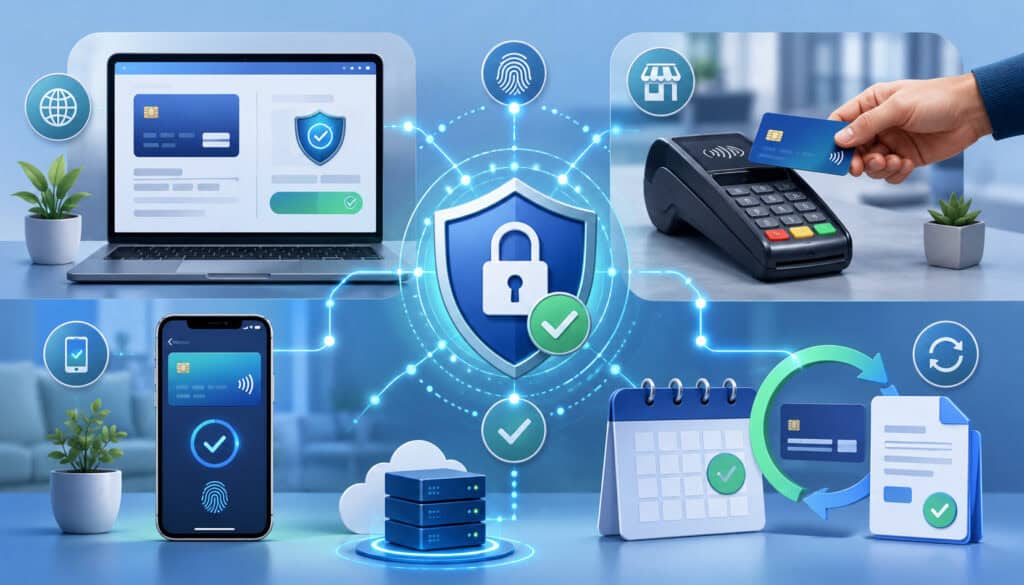
Payment authorization works differently depending on the channel. A card-present transaction at a countertop terminal does not carry the same risk profile as an online checkout authorization.
A recurring subscription payment does not look the same as a one-time mobile payment at a job site. Merchants should understand how authorization changes across payment environments.
POS Authorization for In-Person Payments
POS authorization happens when a customer pays in person through a terminal, card reader, PIN pad, or integrated point-of-sale system. Card-present transactions may involve chip cards, contactless cards, digital wallets, or magnetic stripe fallback. The terminal reads the card credential and sends the authorization request through the processor.
In-person transactions often benefit from stronger card-present data, especially when chip or contactless credentials are used. A properly configured terminal can reduce manual entry errors, support faster checkout, and improve transaction records.
For retailers, grocery stores, salons, repair shops, and quick-service restaurants, POS authorization speed can directly affect lines, staff productivity, and customer satisfaction.
Merchants should keep terminals updated, confirm that staff know how to handle chip failures, avoid unnecessary keyed entry, and review whether tips, taxes, surcharges, discounts, and partial approvals are configured correctly.
To understand how payment reversals differ from authorization issues, merchants can review this educational guide on payment reversals.
Online Payment Authorization for Ecommerce
Online payment authorization is used for ecommerce payments, payment links, hosted checkout pages, virtual carts, digital invoices, and card-not-present transactions.
Because the card is not physically presented, merchants often rely on additional data points such as billing address, shipping address, AVS, CVV, device data, IP address, email history, customer account behavior, fraud scoring, and 3D Secure.
Card-not-present authorization is more sensitive to fraud rules and data accuracy. A typo in the card number, expiration date, billing ZIP code, or CVV can cause a declined transaction. A mismatch between billing and shipping details may trigger manual review. A high-ticket order from a new customer may be approved by the issuer but flagged by the merchant’s fraud filter.
For ecommerce sellers, payment gateway authorization settings should match the business model. Immediate capture may work for digital goods or stocked inventory.
Authorization-only followed by capture may work better when orders require inventory confirmation, custom fulfillment, or shipping verification. The key is to avoid leaving approved authorizations uncaptured or capturing transactions before the business is ready to fulfill.
Mobile, Contactless, Digital Wallet, and Recurring Billing Authorization
Mobile payment authorization applies to businesses taking payments away from a fixed checkout counter. Contractors, food trucks, delivery businesses, market vendors, field service providers, and event sellers may use mobile card readers, tablets, phones, or wireless terminals.
Reliable connectivity matters because a weak connection can interrupt authorization or create uncertainty about whether a transaction was approved.
Contactless payments and digital wallets use secure credentials that may include tokenized account numbers and device-based authentication. The customer experience is usually fast, but the transaction still goes through authorization, response, capture, clearing, and settlement.
Recurring billing authorization is used for subscription payments, membership fees, retainers, installment plans, and saved-card billing. The first payment may include customer authentication and full card data entry.
Later payments may use a token. Merchants should clearly disclose billing terms, store credentials securely, update expired cards where supported, and monitor recurring declines.
Authorization Holds, Captures, Voids, Refunds, and Settlement
One of the most common merchant misunderstandings is the difference between authorization and the steps that happen afterward. A payment authorization confirms that a transaction can proceed. It does not always mean the transaction has been captured, settled, funded, or permanently final.
An authorization hold is a temporary hold placed against a cardholder’s available credit or available balance. Holds are common in restaurants, hotels, rental services, fuel, appointments, delivery, ecommerce, and service deposits. The hold helps confirm that funds or credit are available before the final transaction amount is known or before goods or services are delivered.
Capture is the merchant’s request to finalize an approved transaction for settlement. In many retail settings, authorization and capture happen almost together.
In ecommerce, a merchant may authorize at checkout and capture after shipment. In service businesses, capture may happen after work is completed. If the merchant does not capture within the allowed timeframe, the authorization may expire.
A void cancels an authorization or an uncaptured transaction before settlement. Voids are often used for same-day mistakes, duplicate transactions, canceled orders, or incorrect amounts. A refund happens after a transaction has settled. It sends money back to the customer but does not erase the original sale from the payment history.
Clearing and settlement occur after capture. Clearing exchanges transaction details among the parties. Settlement moves funds through the payment system so the merchant can be funded, minus applicable fees, reserves, adjustments, or chargebacks.
Payment reconciliation then compares authorization records, captured sales, batch totals, deposits, fees, refunds, and chargebacks with accounting records.
Why Payment Authorizations Are Approved or Declined
Payment authorizations are approved when the issuer and related risk systems determine that the transaction can proceed. They are declined when the transaction fails one or more checks. Declined transactions are frustrating, but they are not always caused by fraud. Many payment decline reasons are routine, fixable, or outside the merchant’s control.
Common payment decline reasons include insufficient funds, exceeded credit limit, expired card, incorrect card number, wrong CVV, invalid expiration date, billing address mismatch, suspected fraud, lost or stolen card status, closed account, issuer system restrictions, unsupported card type, transaction amount limits, merchant category restrictions, duplicate transaction detection, or customer travel and spending patterns.
For card-present transactions, declines may also happen because of chip read failures, fallback rules, damaged cards, PIN errors, terminal configuration problems, or connectivity interruptions. For online payment authorization, declines may be tied to AVS mismatch, CVV mismatch, fraud filters, blocked geographic signals, high-risk device behavior, or customer authentication failure.
Some declines are “hard declines,” meaning the merchant should not retry the same card without customer action. Examples may include stolen card status, closed account, or invalid card. Other declines are “soft declines,” where a retry may succeed after the customer updates information, confirms the transaction with the issuer, uses a different card, or tries again later.
Merchants should avoid repeatedly retrying a declined transaction without understanding the response. Excessive retries can create customer frustration, increase risk signals, and complicate reconciliation. Instead, staff and systems should display helpful messages, offer another payment method, and log decline data for review.
Fraud Screening, Security Checks, and Card Network Rules
Fraud screening adds another layer to the payment authorization flow. The issuer may approve or decline a transaction, but the merchant, gateway, processor, or fraud platform may also review it. This is especially important for card-not-present authorization because the merchant cannot physically inspect the card or interact with the customer face to face.
AVS, CVV, and 3D Secure
AVS, or Address Verification Service, compares the billing address information entered by the customer with information on file at the issuing bank. AVS can help identify mismatches, but it is not perfect. A legitimate customer may mistype a ZIP code, recently move, use a business card, or have an address format that does not match cleanly.
CVV verification checks the card security code entered by the customer. CVV can help confirm that the buyer has access to the physical card or card details, but it does not prove that the buyer is legitimate. Merchants should not store CVV after authorization, and payment security rules restrict handling of sensitive authentication data.
3D Secure adds an authentication step for certain online transactions. Depending on risk signals and issuer rules, the cardholder may be asked to complete an additional challenge or may pass through frictionlessly.
The Federal Trade Commission’s business guidance on data security is a useful reminder that payment safety depends on technical controls, staff procedures, and careful data handling.
Tokenization, Encryption, PCI DSS, and Fraud Filters
Tokenization replaces sensitive card data with a token that can be used for future transactions without storing the actual card number in the merchant’s systems. Encryption protects payment data while it is transmitted or stored in approved environments.
PCI DSS provides a security framework for entities that store, process, or transmit cardholder data, and the PCI data security standards overview is a helpful starting point for understanding the responsibilities.
Fraud filters can review transaction amount, velocity, IP address, device fingerprint, billing and shipping mismatch, order history, email risk, geographic distance, and other signals. Velocity checks are especially useful when a fraudster tests many cards quickly. Merchants can learn more from this guide on velocity checks and fraud prevention.
Fraud tools should be tuned carefully. A strict fraud rule may stop a fraudulent order, but it may also block a legitimate high-value customer. A weak fraud rule may improve checkout completion but increase chargeback exposure. The goal is a balanced risk review process that supports good customers while reducing preventable losses.
Payment Authorization Costs, Fees, and Merchant Considerations
Merchants often focus on processing rates, but payment authorization can affect cost in several ways. Some providers may charge authorization fees, transaction fees, gateway fees, monthly fees, PCI-related fees, chargeback fees, batch fees, or other account-level costs.
Pricing structures vary by merchant account setup, provider, card type, transaction method, risk profile, and business model.
Authorization attempts may matter even when a transaction is declined. Depending on the setup, a merchant may pay a small fee for each authorization request, including some declined attempts. This is one reason avoidable declines, duplicate attempts, and poorly configured recurring billing retries can become expensive over time.
Authorization quality can also affect indirect costs. A high decline rate may reduce sales. A weak fraud setup may increase chargebacks. Poor descriptor practices may cause customers to dispute valid transactions. Inaccurate capture workflows may delay cash flow. Manual reconciliation problems may consume finance team time.
Merchants should ask processors and gateway providers how authorization fees are charged, how decline codes are reported, whether account updater tools are available for recurring billing, how long authorizations remain valid, what rules apply to delayed capture, and whether partial approvals are supported.
They should also understand the difference between payment approval process metrics and actual funded deposits.
For B2B sellers, authorization data may include invoice numbers, purchase order details, tax information, or Level II and Level III data where applicable. For restaurants, tip adjustment rules matter.
For service providers, preauthorization and deposits matter. For ecommerce sellers, authorization timing and fraud screening can affect fulfillment decisions.
Common Payment Authorization Problems and How to Reduce Them
Payment authorization problems often show up as customer complaints, abandoned carts, failed invoices, duplicate charges, pending holds, or accounting mismatches.
The cause may be technical, operational, issuer-related, fraud-related, or customer-related. Merchants can reduce many avoidable problems by improving data accuracy, staff training, system configuration, and reporting review.
One common issue is incorrect payment entry. In card-not-present transactions, a wrong card number, expiration date, CVV, billing ZIP code, or invoice amount can cause declines. In person, staff may accidentally run the wrong amount, choose the wrong transaction type, or retry without realizing the first authorization succeeded.
Another common issue is duplicate authorization. This can happen when customers click the payment button multiple times, staff retry during a slow connection, or a mobile terminal loses signal after sending a request. Even if only one transaction settles, customers may see multiple pending holds and contact the business.
Authorization holds also create confusion. Restaurants, service businesses, rentals, and ecommerce merchants should explain when a pending amount may differ from the final captured amount. If an order is canceled before settlement, staff should know whether to void the authorization instead of issuing a refund.
Decline management is another major area. Businesses should monitor payment decline reasons by channel, issuer response, card type, and customer segment. For recurring billing, failed authorization recovery may include reminder emails, card update links, retry schedules, and alternative payment options.
Customer experience also matters. A confusing checkout form can create more errors. A slow gateway can increase abandonment. A vague decline message can lead to support calls. A strict fraud filter can block legitimate customers.
Payment Authorization Checklist for Businesses
A practical payment authorization checklist helps business owners, finance teams, and operations managers evaluate whether checkout is working as intended. This checklist is not a substitute for processor guidance, card network rules, or security obligations, but it can help identify questions worth asking.
Start with your payment channels. List every place where customers pay: retail counter, restaurant POS, ecommerce checkout, mobile terminal, virtual terminal, invoice link, subscription billing platform, digital wallet, contactless terminal, marketplace, or phone order process. Each channel may have different authorization settings, fraud rules, reporting fields, and staff procedures.
Next, review authorization timing. Do you authorize and capture immediately? Do you authorize first and capture later? Who is responsible for capturing delayed orders? What happens when inventory is unavailable? How are tips, deposits, partial shipments, and custom orders handled? Are authorizations expiring before capture?
Then review security and fraud controls. Are AVS and CVV enabled where appropriate? Are fraud filters tuned to your actual risk? Do you use 3D Secure for higher-risk online payments? Are tokens used for recurring billing? Are staff trained not to write down card numbers? Are systems aligned with PCI DSS responsibilities?
Finally, review reporting and reconciliation. Can your team see approved authorizations, captured transactions, voids, refunds, settled batches, deposits, chargebacks, and fees separately? Can decline reasons be exported? Can transaction IDs be matched to order numbers, invoices, or customer records?
Use this checklist as a working review:
- Confirm all payment channels are documented.
- Verify POS authorization settings for card-present transactions.
- Review payment gateway authorization rules for ecommerce checkout.
- Confirm delayed capture workflows and expiration timelines.
- Monitor decline reasons and avoid unnecessary retries.
- Train staff on voids, refunds, and authorization holds.
- Use AVS, CVV, tokenization, encryption, and fraud filters appropriately.
- Review recurring billing retry rules and expired card handling.
- Match authorizations, captures, settlements, refunds, and chargebacks in reconciliation.
- Ask your provider how authorization fees and declined transaction fees apply.
What is payment authorization?
Payment authorization is the approval step that checks whether a card transaction can move forward. It happens before capture, clearing, settlement, funding, refunds, and reconciliation.
During authorization, the transaction details are sent through the merchant’s payment system, processor, acquiring bank, payment network, and issuing bank. The issuer reviews the request and sends back an authorization response.
An approved authorization usually includes an authorization code. This means the transaction was approved at that time, but it does not mean the merchant has already received funds. The transaction still needs to be captured and settled before funding occurs.
How does the payment authorization process work?
The payment authorization process begins when a customer submits card or wallet information at a POS terminal, card reader, online checkout, mobile device, virtual terminal, or recurring billing system.
The merchant system creates an authorization request and sends it to the payment processor. The request is routed through the acquiring bank and payment network to the issuing bank.
The issuing bank checks available funds or credit, card status, transaction risk, security data, and account rules. It then sends back an approval, decline, or other response.
The merchant system displays the result and decides whether to complete checkout, request another payment method, hold the order for review, or stop the transaction.
What is the difference between authorization and settlement?
Authorization checks whether a transaction can proceed. Settlement is part of the later process that moves funds after the transaction has been captured and submitted. A sale can be authorized but not settled if it is not captured, if it is voided, or if the authorization expires.
Settlement usually happens through batch processing and payment network clearing. Once settlement is completed, funds are sent through the merchant’s processing relationship and eventually deposited, minus applicable fees or adjustments. Authorization is about approval; settlement is about completing the money movement.
Why are card payments declined during authorization?
Card payments may be declined for many reasons. Common payment decline reasons include insufficient funds, exceeded credit limit, expired card, incorrect CVV, wrong billing ZIP code, suspected fraud, lost or stolen card status, closed account, duplicate transaction detection, merchant category restrictions, issuer rules, or technical problems.
For ecommerce payments, declines may also be connected to AVS mismatch, failed 3D Secure authentication, high-risk device signals, unusual order patterns, or fraud filters. Merchants should review decline reports rather than assuming all declines are fraud or customer error.
What is an authorization hold?
An authorization hold is a temporary hold placed on a cardholder’s available funds or credit after an authorization is approved.
The hold helps reserve the amount for a potential capture. Holds are common for restaurants, service deposits, rentals, ecommerce orders, appointments, fuel, and situations where the final amount may not be known immediately.
The hold may appear as “pending” on the customer’s account. If the transaction is captured, the pending authorization is generally replaced by the final charge. If it is voided or expires, the issuer releases the hold according to its own timing and policies.
How long does payment authorization take?
Payment authorization often happens in seconds, especially for standard in-person and online transactions. However, the visible customer experience can be affected by internet connection, terminal performance, gateway response time, issuer systems, fraud screening, or additional authentication.
The authorization itself is quick, but the full payment lifecycle takes longer. Capture, clearing, settlement, funding, refunds, chargebacks, and reconciliation happen after authorization and may follow different timelines depending on provider setup, transaction type, batch timing, risk review, and merchant account terms.
How can merchants reduce failed authorizations?
Merchants can reduce avoidable failed authorizations by keeping checkout forms clear, requiring accurate billing details, using updated terminals, training staff, monitoring decline reasons, avoiding duplicate retries, configuring fraud filters carefully, and offering alternative payment methods.
Recurring billing merchants should use card update tools where available, send renewal reminders, provide secure payment update links, and create smart retry schedules. Ecommerce merchants should review AVS, CVV, 3D Secure, and fraud settings so legitimate customers are not blocked unnecessarily.
How does fraud screening affect payment authorization?
Fraud screening can support safer authorization by checking transaction details before or during approval. Tools such as AVS, CVV, 3D Secure, velocity checks, fraud filters, tokenization, encryption, and PCI DSS controls can help reduce exposure to unauthorized use of payment credentials.
Fraud screening can also create friction if rules are too strict. A transaction may be approved by the issuer but held for merchant review, or it may be blocked by gateway rules. Merchants should review fraud settings regularly to balance risk reduction with customer experience.
Conclusion
Payment authorization is one of the most important steps in card payment processing. It is the moment when a transaction is checked to determine whether it can move forward, but it is not the same as capture, clearing, settlement, funding, refunds, voids, chargebacks, or payment reconciliation.
Understanding that distinction helps merchants manage checkout, customer communication, accounting, and cash flow more effectively.
A strong payment authorization workflow should be fast, secure, accurate, and aligned with the way the business sells. Retailers need reliable POS authorization. Ecommerce sellers need well-configured payment gateway authorization and fraud screening.
Restaurants need clear tip and hold handling. Service providers need thoughtful deposit and delayed capture procedures. Subscription businesses need recurring billing authorization tools and decline recovery processes. Mobile businesses need dependable connectivity and staff training.
Merchants should review authorization settings, decline reports, fraud filters, capture timing, settlement reports, and reconciliation workflows on a regular basis.
They should also train staff to understand the difference between an authorization hold, void, refund, settlement, and chargeback. These operational details can reduce avoidable confusion and improve the customer experience.
Payment authorization requirements, rules, costs, approval outcomes, fraud tools, security responsibilities, and settlement timelines can vary by provider, payment network, transaction type, business model, risk profile, and merchant account setup.
This article is for general educational purposes, and businesses should confirm specific requirements with their payment processor, acquiring relationship, gateway provider, legal advisor, or compliance professional when needed.
The best payment authorization strategy is not about chasing approvals at any cost. It is about accepting valid payments efficiently, reducing avoidable declines, protecting customer data, limiting fraud exposure, supporting clean settlement, and giving customers a checkout experience they can trust.